
MCP Apps
Server-authored HTML apps. An MCP server ships a ui:// resource; Moka renders it in a sandboxed iframe and connects it to the conversation over JSON-RPC. Rich, custom, fully interactive.
Text is a poor interface for many tasks: picking a time, filling a form, comparing options, exploring a chart. Moka supports the two open standards that let agents show real UI in the chat.
MCP Apps
Server-authored HTML apps. An MCP server ships a ui:// resource; Moka renders it in a sandboxed iframe and connects it to the conversation over JSON-RPC. Rich, custom, fully interactive.
A2UI
Declarative, native UI. The agent sends JSON describing components (cards, forms, buttons…) and Moka renders them with its own design system. Safe by construction, works with any model.
| MCP Apps | A2UI | |
|---|---|---|
| Authored by | The MCP server developer (HTML/JS) | The model or the server (JSON) |
| Rendering | Sandboxed iframe | Native components in Moka’s design system |
| Flexibility | Anything a web page can do | Standard component catalog |
| Security model | Isolated origin + CSP; app can only talk via postMessage | No code runs — data only |
| Best for | Dashboards, maps, editors, rich visualisations | Forms, confirmations, choices, cards, generated on the fly |
| Talks back via | tools/call, ui/message, … | Button actions → [ui action] message to the agent |
Start Moka with the built-in demo server and ask:
roll_dice returns an MCP App: an interactive dice roller whose Roll again button calls the tool itself, and Tell the assistant posts a message into the chat.book_table returns A2UI from an MCP server: a booking form with date/time, party size and notes.render_ui tool.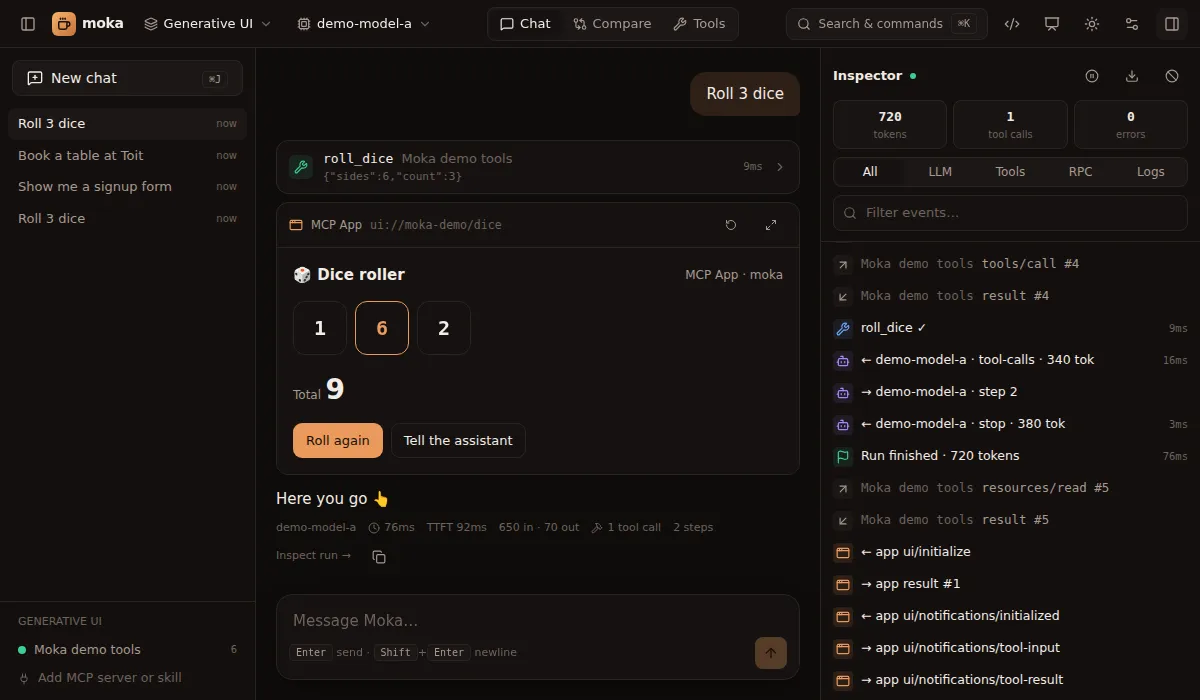
Servers built with the earlier MCP-UI convention — tool results that embed a resource with a ui:// URI and text/html or text/uri-list content — also render, and their tool, prompt, link, intent and notify messages are supported.