
A2UI
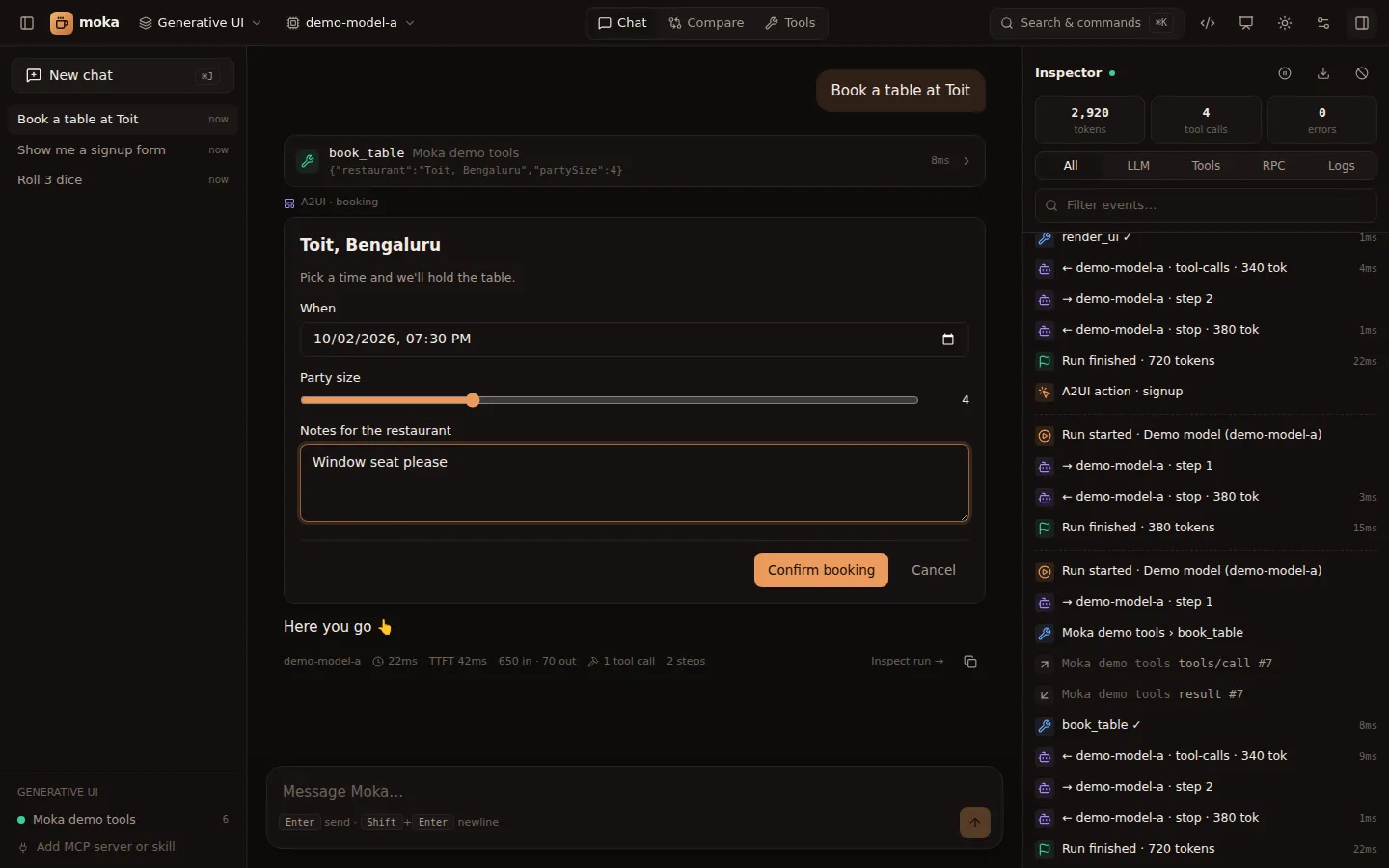
A2UI (“Agent to UI”) is an open protocol where the agent describes UI as JSON data — a flat list of components plus a data model — and the client renders it with native components. No code crosses the boundary, so it’s safe to render UI straight from a model.
Moka implements A2UI v0.9 (and reads v0.8 messages), with the standard component catalog.
Two ways to get A2UI in Moka
Section titled “Two ways to get A2UI in Moka”Every workspace gives the model a built-in render_ui tool. Its description teaches the model the component catalog, so it works with any tool-calling model: GPT, Claude, Gemini, Llama. You can rename it, restrict or extend its components, and theme it; see Customize the render tool and Custom catalogs.
{ "surfaceId": "signup", "components": [ { "id": "root", "component": "Card", "child": "col" }, { "id": "col", "component": "Column", "children": ["title", "name", "plan", "go"] }, { "id": "title", "component": "Text", "text": "Join the beta", "variant": "h3" }, { "id": "name", "component": "TextField", "label": "Your name", "value": { "path": "/name" } }, { "id": "plan", "component": "ChoicePicker", "label": "Plan", "value": { "path": "/plan" }, "options": [{ "label": "Free", "value": "free" }, { "label": "Pro", "value": "pro" }] }, { "id": "go-label", "component": "Text", "text": "Sign me up" }, { "id": "go", "component": "Button", "variant": "primary", "child": "go-label", "action": { "event": { "name": "signup", "context": { "name": { "path": "/name" }, "plan": { "path": "/plan" } } } } } ], "data": { "name": "", "plan": "pro" }}Moka validates the tree against the active catalogs (a root component must exist, every reference must resolve, components and required props must exist). If it’s invalid, the model gets a precise error and usually fixes it on the next step.
Return A2UI messages from any tool as an embedded resource with mime type application/json+a2ui:
server.registerTool("book_table", { inputSchema: { restaurant: z.string() } }, async ({ restaurant }) => ({ content: [ { type: "text", text: `Showing a booking form for ${restaurant}.` }, { type: "resource", resource: { uri: "a2ui://my-server/booking", mimeType: "application/json+a2ui", text: JSON.stringify([ { version: "v0.9", createSurface: { surfaceId: "booking", catalogId: "https://a2ui.org/specification/v0_9/standard_catalog.json" } }, { version: "v0.9", updateComponents: { surfaceId: "booking", components: [ /* … */ ] } }, { version: "v0.9", updateDataModel: { surfaceId: "booking", path: "/", value: { restaurant } } }, ]), }, }, ],}));Moka also accepts structuredContent: { a2ui: [...messages] }. The UI payload is replaced with a short placeholder in the model’s context, so it doesn’t waste tokens.
Messages
Section titled “Messages”| Message | Purpose |
|---|---|
createSurface | Start a surface (surfaceId, catalogId) |
updateComponents | Add or replace components on a surface (flat list, referenced by id) |
updateDataModel | Set data at a JSON Pointer path (default /) |
deleteSurface | Remove a surface |
Exactly one component per surface must have "id": "root". v0.8 messages (surfaceUpdate, dataModelUpdate, beginRendering, {"Text": {...}} wrappers) are converted automatically.
Data binding
Section titled “Data binding”Any property can be a literal or a path into the surface’s data model:
{ "id": "greeting", "component": "Text", "text": { "path": "/user/name" } }Input components (TextField, CheckBox, Slider, ChoicePicker, DateTimeInput) bind two-way: the user edits the data model directly.
Lists can repeat a template for every item of an array:
{ "id": "list", "component": "List", "children": { "componentId": "row", "path": "/items" } },{ "id": "row", "component": "Text", "text": { "path": "name" } }Inside a template, relative paths ("name") resolve against the current item.
Actions: how the agent hears back
Section titled “Actions: how the agent hears back”When the user presses a Button, Moka resolves the action’s context against the data model and sends the agent a user message:
[ui action] {"name":"signup","surfaceId":"signup","sourceComponentId":"go","timestamp":"2026-09-25T10:12:00.000Z","context":{"name":"Batman","plan":"pro"}}The chat shows a compact chip (▸ signup) instead of the raw JSON, the button is marked as sent, and the agent continues — for example by calling a booking tool with those values.
See every supported component in the component catalog.